
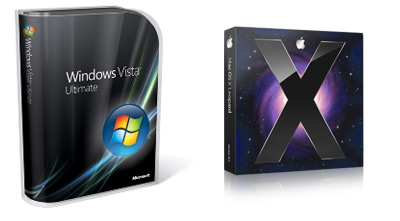
So I finally got myself a MacBook Pro. I’ve had a love / hate relationship with Apple products over the years and I’ve considered switching for a while. One of the things that turned me off was the Mac fanboys who insist that switching will bring you closer to God. This post is an attempt to give a less biased opinion on the pros and cons of switching.
In my case I’m switching from a Lenovo Thinkpad T60 running Vista to a MacBook Pro running OS X Leopard. Let me know if I’ve missed anything in the comments.
THE GOOD
1. Design Aesthetic
Using my Mac I feel cooler, calmer and more zen-like. The makers of OS X have paid a lot more attention to it’s visual design aesthetic. OS X is nicer to look at, and there is a focus on simplicity that makes the OS a pleasure to use. If you care about visual design you should probably be using a Mac.
The hardware is also beautiful, from the glowing logo on the back of the brushed metal case to the keys that automatically light up. The magnetic power cord is another clever touch.
The built in screen savers, desktop wallpapers, and sounds are all very tasteful and well done. One niggle is the default ‘Aqua’ OS X scrollbars that are, dare I say it, a bit cheesy (bright blue jelly tubes – really?).
Fonts are handled differently on OS X. The fonts are more ‘correct’ in that they match their intended shape better, but they are also softer + blurrier. Whether you like this is largely a matter of taste. I personally like the crisper pixelated look of the PC fonts, although the OS X fonts are growing on me.
2. It Just Works
In general the Mac just works. Since I’ve been running it for the last month the OS has never crashed. Force quit always kills an app instantly (on Vista killing an app can take a couple of minutes of bashing the keyboard). You can delete any file instantly (on Vista forget about it).
There is a simplicity to OS X that is very refreshing. There are less options to configure in OS X’s System Preferences than the maze-like nested dialog boxes that comprise the Windows Control Panel. The options that are there are better laid out and make more sense. Installing new apps on the mac is incredibly simple. Just drag the app icon into your applications folder – that’s it!
3. Security Handling
Vista is like an over protective grandmother – it’s constantly trying to scare you that anything you do could lead to irrevocable harm to your machine. Even after disabling UAC you are constantly offered warnings and “are you sure?” prompts.
Mac security is fantastic in it’s simplicity. There are 2 main components: If you download and run an executable for the internet, the OS will warn you and ask if you really want to run it. Also, installers that modify system settings require you to type in your OS password. That’s it. No other warnings or prompts.
To be fair, part of what makes security less of an issue on the Mac is that virus writers target it less often. Since Windows is by far the dominant Business OS, it’s a more valuable target. Regardless, I think that Vista’s focus on security over all other concerns, throws the baby out with the bath water in terms of usability.
4. Power Management
Open the lid on my MacBook and the screen lights up and you are ready to go in 5 seconds every time. Open the screen on my Vista Thinkpad and it’s a crap shoot whether it turns on, stays asleep or requires a reboot. Mac reboots are also a lot faster than Vista, and since the OS is more stable you will be rebooting less often.
5. Multitouch Trackpad
Two finger dragging to scroll is genius – it’s so natural I keep trying to do it on my PC. I haven’t used the pinch gesture much but it’s nice to know it’s there.
THE BAD
1. Missing Keys/Too Many Keys
This is the biggest hurdle for I’ve found switching, and it’s the reason I’m not typing this on my Mac right now.
From years of PC usage, my hands are hardwired to constantly use the following keys: Home, End, Page-Up, Page-Down and Delete (forward delete). The Mac has none of these. Every time I compose a doc on the Mac, my hands are tripping up and I find myself laboriously cursoring to where I need to be.
I am aware that there are key combinations for the above functionality on the Mac, but using them is compounded by the other flaw on the Mac keyboard: too many modifier keys. On the PC there are 3 modifiers: Ctrl, Alt and the Windows key. In general you only ever use Ctrl. Alt is used for ‘advanced’ operations that overload Ctrl. The Windows key is reserved strictly for OS operations.
On the Mac there are 4 modifier keys: Fn, Control, Option/Alt and Command/Clover. There does not seem to be any logic as to which modifier does what. For example for Page-Up you do Fn-Up and for End you do Command-Right. Make sense?
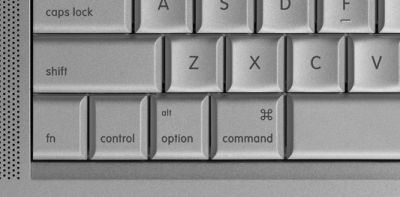
I realize that using keyboard shortcuts is partly a matter of what you are used to, but in my opinion the windows keyboard is more usable and makes more sense.
2. No Maximize
On the Mac there is no way to have an app go fullscreen. The little green plus button at top left of a Mac window is a kind of mystery button: it may enlarge your app, it may shrink it, but it will never make it fill the screen. When my app is not maximized I feel distracted by the clutter of the dock and extra window chrome, plus it’s a waste of valuable screen real-estate. This one is odd, since it seems to run counter to the Mac UI principals of focus and simplicity.
3. No Right-Click Button
Two finger tapping for right-click is cool, but it would be cooler for Apple to finally cave on the fact that the Mac needs 2 mouse buttons. Most Mac apps use right-click (sorry command-click) extensively. Apple even sell a 2 button mouse. However they refuse to add a second button to the Mac itself. I imagine there is some pride and politics in this decision. Mac design could never follow the PC – unthinkable!
A couple of other hardware niggles: The MacBook Pro runs very hot – I mean burn your thighs hot. Also, the keyboard tactile feedback and key depth is not great when compared to the Thinkpad.
4. Finder is Lame
The OS X Finder seems a bit underpowered compared to Windows Explorer. It’s hard to copy files from one folder to another without having multiple windows open. I always seem to have way too many Finder windows open and be closing and respawning them. On Vista, I can have one Explorer window open all day and drag files between the folders in the folder tree. Also there’s no way to view file details in column view.
5. Cost
Buying a Mac is still very expensive when compared to a PC with the equivalent CPU power. Regarding the OS software price, on Windows you buy the OS once then Service Packs are free. New Windows OSs come about once every 5 years. The Mac OS seems to be updated about once a year and you have to pay to upgrade each time.
When it comes to 3rd-party apps, the PC has more true freeware, whereas many smaller apps on the Mac cost around $50 (e.g. TextMate versus Notepad++)
Regardless of this, if you are using a computer for 8 hours a day, then it really makes sense to buy the best one you can afford.


 Latest Tweets