
I’ve been using Vista for about a year now and overall I’m pretty happy. It’s essentially XP with nicer drop shadows. But there is one thing that drives me absolutely nuts and I’ve yet to find a solution for it.
Almost every time I try to delete a folder off my machine I get this message: “Destination Folder Access Denied. You need permission to perform this action.” It’s my folder, I created it on my own machine. Who do I need permission from? Bill Gates? My mother?
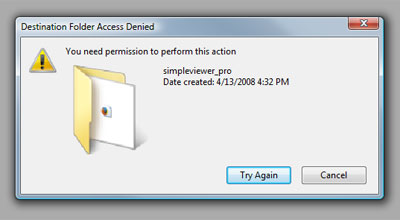
The whole idea is ridiculous. This is my machine, I’m logged in as an Administrator – I should be able to delete any file I want. If the file is in use by another process, please let me know about it, but ultimately the decision to delete should be mine.
This issue is symptomatic of a general level of distrust in the user. It’s great to prevent newbie users from deleting the ‘windows’ directory, but please have a power-user mode where I don’t have to be nannied with warnings and wizards every step of the way.
Unlocker is a nice freeware app that sometimes fixes this problem but often it too is helpless against vista’s security restrictions. I did disable the UAC (another vista annoyance is the fact that you get a warning message every time you reboot telling you that disabling the UAC is a terrible idea) but this does not help with this issue.
(This anti-Microsoft rant is here to provide balance for some of my previous anti-Apple rants).








 Latest Tweets