
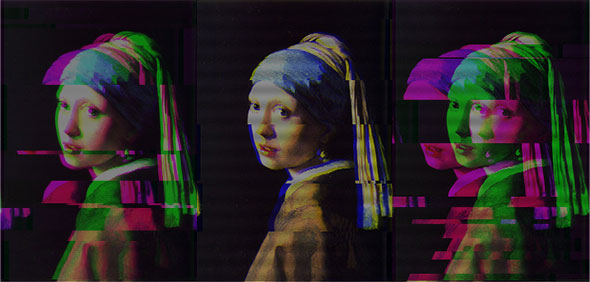
ImageGlitcher allows you to glitch any image and save the result. Glitched images look like they are being displayed on a broken analog TV. Check it out here.
This demo was built using Peter Nitsch’s BitmapData.js – a very useful JS port of ActionScript’s BitmapData class which makes it easy to manipulate canvas image data. After playing around with it for a while I got some pleasing glitched image results, so I figured it would be useful to wrap it up as a little app. The glitch effect is achieved by:
- Slicing the image horizontally and randomly offsetting the slices
- Randomly selecting a color channel and offsetting again
- Brightening the image
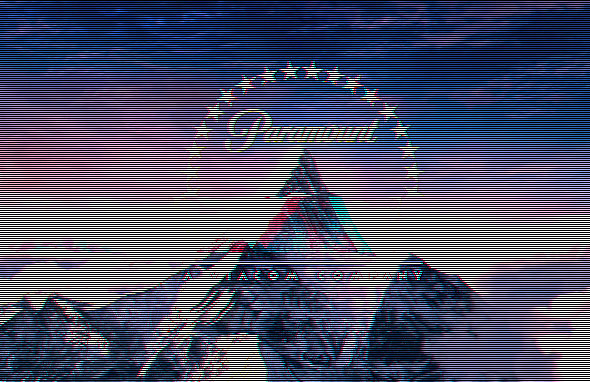
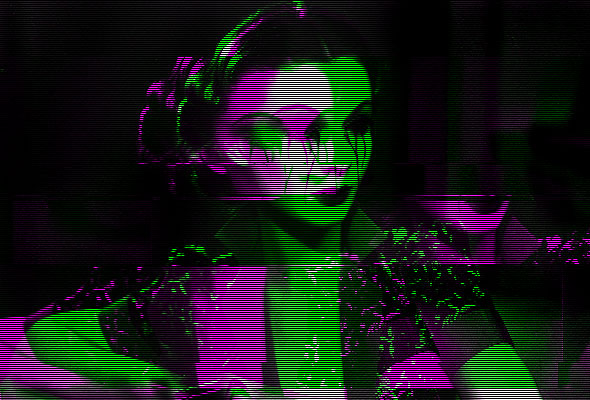
- Adding a ‘scan lines’ overlay.
All the source code is viewable via ‘View Source’. Surprisingly, cross browser development wasn’t too much of a pain once I ignored IE. One of the cool features of HTML5 is native drag and drop support. On Chrome and Firefox you can drag in an image from the desktop.
One issue that came up was that the canvas tag does not allow you to getImageData() on images that are from a different web domain. This is supposedly a security feature to prevent hackers copying images, although I fail to understand why. If a hacker has the URL of an image on your website he already has a local copy of the image – right? Anyway $.getImageData gets around this feature by routing image data through Google App Engine using JSONP.
If I get time there are a few features I want to add in the next version:
- Add ‘Instagram’ style filters
- Add more granular filter options
- Use web workers to avoid hang time
Let me know if you find any issues or if you create any nice images, post a link in the comments.
UPDATED – 9 May 2013
- Removed loading remote images via $.getImageData. Their service appears to be down.
- Added additional controls
- Removed image size limit
- Improved messaging


 Latest Tweets
[…] This post was mentioned on Twitter by Felix Turner, Jay Kokernak. Jay Kokernak said: nice work! love the effect > RT @felixturner: New Blog Post and HTML5 demo – Glitch Your Images with ImageGlitcher: http://bit.ly/geHqSi […]
Um… Hey, (I’m sorry if that doesn’t belongs here)
but I wanted to glitch an png pic of mine were only the person is getting the glitch effect. But it also affects the background. What should I do?
(I’m from german so sorry for the bad english)
The best thing to do would be to cut the subject out first and after you do the effects re paste it
The following wikipedia article describes the scenario where accessing the pixel data is a security issue (which also why Flash also prevents you from capturing pixel information for movies from other domains):
http://en.wikipedia.org/wiki/Cross-site_request_forgery
The idea is:
1. BankSite has an image on it which renders your account information (we’ll call this PrivateImage).
2. Hacker knows the URL of the PrivateImage (http://bank.com/password.png), but can’t access it because it’s protected by a login/password authentication.
3. Hacker builds a HackerSite which embeds the image (anyone can visit this site, but the browser fails to load PrivateImage because they are not authenticated)
4. HackerSite tricks you into visiting their website with promise of delivering a larger penis
5. Because you are authenticated by a cookie from a previous login, the browser is able to load the PrivateImage into the hacker developed webpage (PrivateImage is downloaded from the bank into your browser, hacker still can’t access your PrivateImage because it’s in your browser)
6. Javascript code on the webpage copies the pixel data out the the image and posts it back to the Hacker server
7. PrivateImage is now in the hands of hackers
While it’s unlikely that your bank account info is rendered as an image, there may be all sorts of private photos which could be accessed this way.
Noel
Wow, that gets some really nice effects.
See also – a couple of different implementations using Flash – http://blog.soulwire.co.uk/laboratory/flash/as3-bitmapdata-glitch-generator
http://blog.madebypi.co.uk/2010/03/10/jpeglitch-test-suite/
hey, love this! so cool. i want to print some, but the images are tiny. anyway to get a high res glitcher, one that wont make a smaller file of the imported image? email me if you can help.
This is genius! Thank you, played for 30 mins with it.
Hey, ImageGlitcher was working the other day, i don’t know if it’s my browser or something, but know, when i post the image URL, i get an error message saying “Image not found”. It was working fine the other day so… i don’t know whats going on.
Anyway, i hope you can reply. ‘Cause i really like this program. 🙂
-TheShadowman60
I loved this alot but when I click “save image” it takes me to another tab so I would right click and say “save image as” it won’t save 🙁
Glitch Your Images with ImageGlitcher — Airtight Interactive http://t.co/t0Se4KEK
I see the page is no longer there, I was wondering is it going to be put up again any time soon?
Fixed now thanks.
I can’t seem to drag and drop or upload images from either Opera, Firefox, or Chrome. Any solutions?
It keeps saying “Image not found” no matter image link I post. Couldn’t get it to work with any of my own pics unfortunately (using Opera 12 and latest Chrome). Apart from that — amazing stuff. Hope you could fix this sometime soon.
It’d be nice if it actually worked. If I try upload an image from a url, it always says “image not found” even images from google :\
It appears that loading images from an image URL is broken, however you can still glitch images from your desktop via drag and drop. The service I’m using to get image data is down right now, I’ll look into a solution at some point. Glad to know people are still using this thing!
This is amazing! Is there an android version in development?
Is it possible to have a option to remove the scan lines?
It would be preferable that I could drag and drop my images on here – I do use Chrome but when I do drag and drop, it opens my image in a new tab! Please can you fix this soon as I would love to use this.
Is it open source?
it’s not working i even tried reducing the size of the picture , i have been waiting for around 10 minutes and the image doesn’t glitch still says ”glitching…” help? i really like the glitching effect but doesn’t work , using google chrome.
Hey I was just trying to glitch this image http://images.fanpop.com/images/image_uploads/Space-space-584336_1600_1200.jpg without scan lines (looked sweet the one time it worked) but my chrome tab keeps crashing, It worked once but when I tried to save it it crashed. Just tried firefox and it works fine there. Sweet app, mate.
If chrome is crashing, it means the image is too large. I recommend images less than 1024 x 1024.
Hey, what can I say, this is brilliant, I do believe that Glitch art is about to take off, obviously it’s been around for a while but I think it’s about to have a revival and it’s gonna be big, so I’m glad you guys are here for those of us who are either to lazy to get computer savvy enough to glitch our own images or just lack the knowledge to, so thanks a million for doing this. I’m wondering if we can expect an app at some point, I have a droid and I couldn’t find a damn thing, so I’m hoping someone eventually makes an app for this, that being said my only feel back is that maybe the scan lines should come in several options, sometimes they look to small, other than that maybe just more breaks in the “glitches”
I’ll be sure to post an image soon, once I get one I’m really satisfied with though, thanks again.
[…] http://www.airtightinteractive.com/2011/02/glitch-your-images-with-imageglitcher/ […]
Everything seems to be working ok for the most part, I just have a question as to why it seems that different websites seem to handle the colors of the glitches in different ways upon upload.
For instance i put the same image on my Facebook, Tumblr and on Imgur but the FB one ends up duller and the colors not as bright.
Is this because of compression or? I’m not really sure why it’s doing this.
Even certain programs i try and load the photo in to end up treating the image a lot duller it’s weird.
You my friend, have created visual GOLD… exxxcellent… amazing, glitched high five!
I’m sorry for complaining but whenever I try to glitch a picture it always freezes up my computer. It always crashes when I press ‘Glitch’. Is there any way or changing my pictures to make them glitch instead of crash my computer. I made sure that the image was smaller than 1024 x 1024.. Can I get some help?
when i drop an image onto the box it takes it to another page that don’t have your controls at the bottom. it works when i use the provided images but i want to glitch my own. i’m on a mac using safari.
“Save Image” Crashes Google Chrome as soon as clicked. Loosing a lot of time.
Can this be fixed?
Dude, this would be sooooo cool as a plugin for photoshop! Ive been searching for something like this, and its not working with my chrome, as the save image functions makes it go kaputz.
Please make this into a plugin or downloadable program! 😀
Try using Firefox. Worked for me.
Is there a iphone app for this?
absolutely love it.
I have tried Google Chrome and IE 9 and it NEVER lets me save anymore. It always fails to save and it is rather annoying. Please get this fixed, I love glitch more than anything and I used to spend hours making pictures with this but now I can’t 🙁
the link is down 🙁 please fix it pleeeeeeaseeeee
lol it works now 😛
“The page you requested no longer exists” is ImageGlitcher down or something ?
The glitcher page is loading for me. What URL are you viewing?
They must be viewing this, because I am experiencing the same problem: http://www.airtightinteractive.com/demos/js/imageglitcher/
Oh, nevermind. I just reloaded the page and it started to work again.
The image glitcher was working for me yesterday but it’s not working today. It says that the page no longer exists. Not sure why.
Alright, I’ve figured it out. It seems that while I have it in my favourites it won’t work, even the direct link to it was saying it doesn’t exist but the moment I deleted it from my favourites it worked again. There you go.
“The page you requested no longer exists” is ImageGlitcher down or something ?
Nice app.. but all these lamers make me want to cry..
404 Nothing Found
The page you requested no longer exists. Please try searching here:
uh oh?
404 Nothing Found
The page you requested no longer exists. Please try searching here:
OK Hopefully I’ve fixed the 404 error. I think it was caused by a bad WP plugin. Let me know if you see it again!
Hi! This looks brilliant. I really want to try it, but I don’t really understand this drop the image thing. Can you tell me how it works?
WOWOWOW AMAZING 🙂
I want an Android app with it ç__ç
ANDROID APP
ANDROID APP
ANDROID APP
ANDROID APP
ANDROID APP
ANDROID APP
ANDROID APP
ANDROID APP
cheers
I gave it a try but it threw an unresponsive script error.
[Firefox 30.0 / OS X 10.8.5 / PNG image @1494x1218px]
Is There a way to add other Image’s then just one?
So that there is a animation tpy deal?
Can you create a bulk upload option so the same affect can be applied to an entire folder please?
can’t add photo
Is there any chance of this becoming a standalone application? The lack of being able to glitch larger images really is a crippling blow to the usefulness of this, even though when it does work it’s amazing in quality. Even with a powerful computer the program is currently limited by the browser you use, so you still can’t convert wallpaper etc. sized images.
I’m replying under Yes because I have the same issue. I love this generator but would also love the ability to render full size images. Is there a way to do this? Can the app be put in a form that can be run on a computer instead of the web? I don’t know the hardline functionality of the app, but it would be awesome if I could process larger (full size full frame camera) images.
Awesome work!
I was wondering how to apply the color channel glitch given a canvas. Would you mind send me a code snippet on how to achieve this?
I’m redesigning my website and I’m trying to use this color channel glitch effect on it. I will of course reference you as source 🙂
Thanks in advance!
@Leonardo – all the JS code is unminified in the page source. You are welcome to reuse it.
Update – Check out MOSH for more image glitching goodness!
MOSH is fantastic. Thanks!
Love this so much but it’s stopped working. Images won’t load, the scanlines button is gone and so is the brightness options? Please fix 🙁
Good call. I had uploaded an old version. Fixed!
[…] https://www.airtightinteractive.com/2011/02/glitch-your-images-with-imageglitcher/ Visitado em 17/07/2016. […]
Mobile accessibility? Drag & drop is great, but not so much if you’re using Android. Love this site BTW.
I have a computer that doesn’t put stuff onto the desktop, (and I have tried multiple times to do so), so it won’t work for me. Is there a way to add an “Import Image” option?